
Download Lucky Patcher
Do you want to download Lucky Patcher on your device? Then let’s get started!
Discover the latest version of Lucky Patcher, a tool with which you can patch and modify the applications on your devices.
Here you will discover how this App works, what are its main features and how to get the most out of it. Don’t miss it!

Application for Android
 Lucky Patcher is compatible with the Android operating system. Download the App and enjoy all its functions.
Lucky Patcher languages
 This tool is available in many languages, including English of course, so download it and choose the one that suits you best.
Download the latest version
 Having the latest version will always give you access to the most benefits of the tool. Get the latest version here!
What is Lucky Patcher?
The App is a tool for modifying or patching other applications installed on Android smartphones and tablets. One of its most useful uses, is to be able to remove ads, get access to paid content for free and many other things.
With Lucky Patcher, users can run any application without rooting their device. This means that it is not necessary to have administrative privileges to gain access to some hidden or disabled features by default.

In addition, with the App you can create backups of all your applications and data before modifying them. This means that if something goes wrong during modification, you can always revert to the backup.
Lucky Patcher lets you modify the executable files of other applications and thus, add more interesting features such as being able to use the 'undo' function in a text editor that has that feature locked.
For the classification of Apps, Lucky Patcher uses the following colour coding:
- Green: For Apps that can be registered.
- Yellow: These apps have particular patches for them.
- Blue: You will be able to remove all software that has ads.
- Violet: These apps are part of the boot list.
- Red: These are Apps that are impossible to modify.
- Orange: This is a warning. Modifying one of these applications can have serious consequences, such as rendering your device completely unusable.
How does the application work?
Lucky Patcher is a very versatile App that offers many useful tools to customise your device and get the most out of your favourite Apps. With it you can modify and patch apps on your smartphone and have full control over your device by configuring it to your liking.
In all mobile phones there are a lot of applications that come pre-installed and that you don't want to have, unfortunately you can't remove them from your device, this is called 'bloatware'.
By installing Lucky Patcher on your smartphone or computer this has come to an end, because, among other things, this is what this app does, you can easily uninstall applications that do not interest you and free up space on your device.
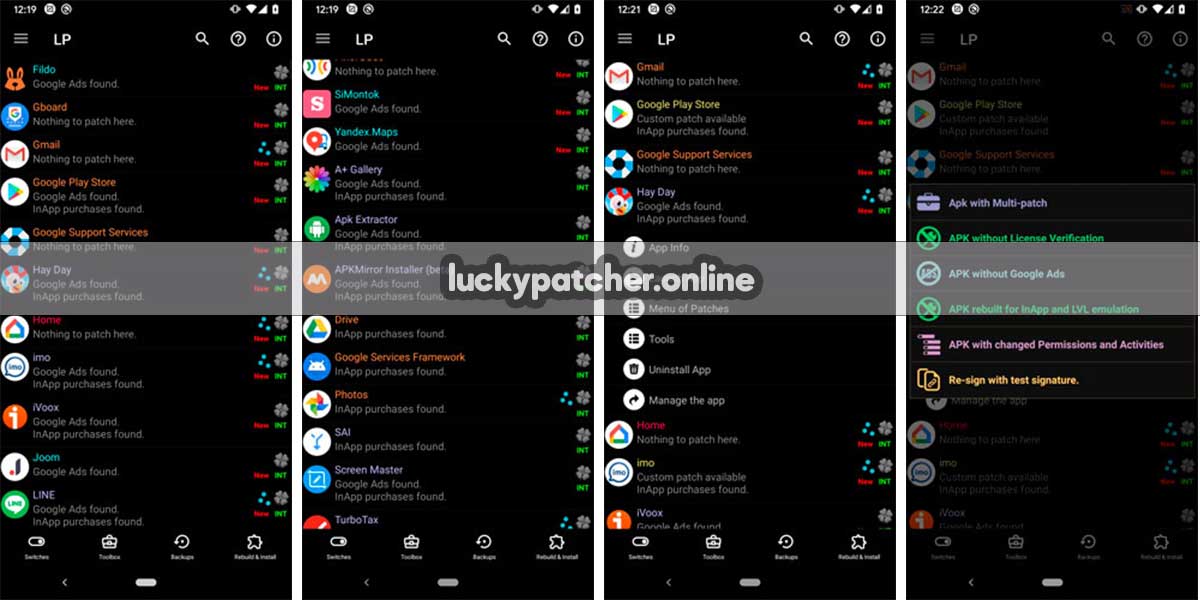
Here is a quick guide on how the Lucky Patcher App works:
- Download and install the latest version of Lucky Patcher on your Android device from the download button.
- Run Lucky Patcher and select the app you want to modify.
- Click 'Patch' and then select 'Remove License Verification'.
- Select 'Test Mode' and then click 'Start'.
- The application will launch and is ready for you to test.
- Once you are happy with the changes you have made, click 'Save' to keep them.
- Launch the App again and you will see the changes you have made.
And that's it. Now that you know how to use Lucky Patcher, you can modify any App you want!
Lucky Patcher Features
This wonderful application has multiple advantages and functions, we detail you the most incredible actions:
- Modify the permissions of other apps as you want. You will eliminate the permissions requested by the Apps that seem suspicious to you.
- Eliminate the advertising that bothers you so much and that you couldn't avoid before.
- Unlock Apps so you can take them to another device.
- Remove the licence verification.
- Create backups: You can create backups of all your apps and data before modifying them. This means that if something goes wrong during modification, you can always revert to the backup.
- Extract the executable of any App and make a backup.
- You can modify the file of your favourite games to get free coins and gems, as well as unlock additional levels.
- Get free versions of premium Apps.
- Change the look and feel of Apps.
Download and install Lucky Patcher App
You won't find this App on Google Play Store, but that doesn't mean you can't have it. You can download the application from our website by clicking on the download button below.
In order to install Lucky Patcher on your Android mobile phone or tablet you will need to enable unknown sources in 'Settings' to allow installation.
| Name | Lucky Patcher |
| Version | 11.7.6 |
| Developer | ChelpuS |
| Operating System | Android 4.0+ |
| Size | 10,10 MB |
| Updated | One week ago |

If you want to get the most out of Lucky Patcher, you have to be superuser of your Android terminal, for this you will need an App to root your device. This is only available for Android. For iOS users, it is not available at the moment.
There are several Apps you can use to root your smartphone such as: Magisk Manager, Kingo Root (also called King Root), One Click Root and Root Master, these are among the most trusted ones.

Although, if you want, you can use Lucky Patcher without rooting your device, but not all features will be available.
If you have any doubts about how to do it, here is a detailed tutorial for you to follow step by step.
How to root your Android device
Some of the main features of Lucky Patcher require root permissions to run. So you need to root your phone to get the most out of the App, here's how:
- Back up your data: Before rooting your phone, it is important to make a backup of your important data to avoid data loss in case something goes wrong during the root process.
- Download a permissions manager: There are several Apps that you can use to root your phone as explained above. Select the one you like the most and download it to your device.
- Enable the 'Unknown sources' option: Before installing the root application you will have to enable the option in the security section of your device. This will allow you to install Apps that are not available in the Play Store.
- Once installed on your phone, open it and follow the on-screen instructions to root your device.
- Reboot your phone: After rooting your phone, it is recommended that you reboot your phone to ensure that all changes have been applied correctly.
- Once the process is complete, your device will be rooted and you will have access to root permissions.
How to install Lucky Patcher on a device (rooted or non-rooted APK)
The process is quite simple, just do the following:
- Open the device settings and click on Security (or Privacy).
- In the dialog box about whether you want to install the App click 'Yes'.
- Enable the option to allow unknown sources.
- Open your downloads folder and click on the Lucky Patcher file.
- Click Install in the pop-up message.
- Wait for Lucky Patcher to install on your device.
How to use the app on an unrooted device
The Lucky Patcher App works in the same way, whether your device is rooted or not. The only difference is that if your device is not rooted you will not be able to access all the functions offered by the App.
For example: If you open the App you want to modify, when you click on 'Menu of Patches' the only option available is 'Create Modified APK File'.
Frequently Asked Questions about Lucky Patcher
If you need more information about this amazing App, here are the most frequently asked questions from users. If you have a question that is not among them, leave it in the comments section and it will be answered.
What is Lucky Patcher App?
It is an App that allows you to modify and patch other applications. With Lucky Patcher, you can remove ads from other apps, unlock premium features and much more.
How does Lucky Patcher work?
It works by scanning Apps installed on the device and looking for vulnerabilities that can be exploited. Once it finds a vulnerability, Lucky Patcher modifies the App code to remove ads or block in-app purchases.
Is the App safe to use?
Yes, Lucky Patcher is safe to use. The App does not contain any malware or viruses, so there is no danger of infecting your device if you download and install it. However, due to the nature of the app, it is recommended that you always use the latest version to ensure the safety of your device.
Is Lucky Patcher free?
Yes, it is completely free. There is absolutely no need to pay anything to download or use the App.
Why do I need the app?
There are many reasons why someone might want to use Lucky Patcher. For example, if you want to remove annoying ads from other apps, unlock premium features or simply get root access to your device, the App can help you.
Do I need to root my device to use the App?
It is not necessary to root your device, Lucky Patcher works equally well with or without root, only that if you do not root your device you cannot access all the features that the App can provide you with.
Can I use Lucky Patcher to modify games?
Yes of course, although not all games can be patched with the tool. Here is a list of the most popular games that can be patched with the app.
- Application for Android
- Lucky Patcher languages
- Download the latest version
- What is Lucky Patcher?
- How does the application work?
- Download and install Lucky Patcher App
- How to root your Android device
- How to install Lucky Patcher on a device (rooted or non-rooted APK)
- How to use the app on an unrooted device
- Frequently Asked Questions about Lucky Patcher
Leave a Reply
What phrase... super, magnificent idea